On your phone;
1. Connect to your wifi (where ubiquiti is connected)
2. Open wifi settings,
3. on IP settings select Static
4. on ip address change it to 192.168.88.200 (depends on your ubiquiti ip)
Done.
#ubiquiti
#accessubiquitithrumobilephone
Wednesday, July 22, 2020
HOW TO ACCESS UBIQUITI PRODUCTS THRU ANDROID PHONE
In this video I tried accessing ubiquiti dashboard using lap 120 thru android phone.
lap 120 with ip 192.168.88.201 connected to B525

Tuesday, March 31, 2020
Equilibrium of Pandemic
Equilibrium of Pandemic
Money is no longer an instrument to make you rich, mortality is same as the poor.
Power doesn't offer an immortality, but a responsibility.
Religion is not a saviour from plague, but each individuals faith.
Catastophe is the way of justice...but an accomplishment for the horsemen.
Nature has its own way from its great equilibrium. Death is upon us, who will survive? Not our choice..
Only the great creator knows the reason for killing the herds, to save the grassland, to bring an equality for surviving lambs.
Humans will able to continue - to tell our story, as younger was more stronger than the old, capable to adopt the venum of the genocide.
Hope will change the course of history.
New beginning will rise.
#StayAtHome
©️ brainjunk 2020
Wednesday, January 24, 2018
HOW TO OPENLINE GLOBE WIRELESS LANDLINE (HUAWEI F362)

Lots of method online like code generators... etc but this one seems the most easiest method without any softwares needed, thru changing the IMEI.
Change IMEI instruction:
1. *1673495 press dial
2. Para Set
3. Update IMEI Number = a864992024531967 or 1864992024531967 exit
4. # # #1111# press dial
5. NCK Enter = 4917904896193488
6. Press ok
7. Sim card Lock press ok then Select off It will off automatically now insert sim then Power on your Phone Done...
IMEi will return to its original after the process,
Saturday, December 16, 2017
USB FLASH DRIVE CANNOT READ FILES/MOVIES ON TV AFTER USING IT AS BOOTABLE
Well, as the title says, it might be frustrating for some even you already formatted your USB drive over and over again but still can't read files thru your tv, but not after all after reading this article, although Google has an answer for it but doesn't elaborate on how to do it, the noobs style, here is a simple yet EFFECTIVE WAY to use your usb flash again in watching movies thru it. The culprit in this problem was the GPT (Gui Partition Table) since most of the new PC today required a GPT instead of MBR (Master Boot Record) in formatting a Wimdows.
Things needed:
- RUFUS (portable version so no need to install)
- PC
- your USB flash drive
Here we go:
- Insert your USB flash drive into any usb port of your PC
- Back up all the necessary files in your USB flash, because we will be wiping out all your files by formatting it
- Open RUFUS and follow these steps,
> Select MBR partition scheme for UEFI
> Select NTFS
> Uncheck bootable disk using..
> Uncheck create extended label and icon files
> Lastly click Start and wait, you do the math.

Monday, January 30, 2017
How To Combine/Connect Two or More ISP Into Single Internet Connection
Noobs Definitions of Terms:
ISP = Internet Service Provider (Example: Smart, Globe, PLDT, etc..)
Things Needed:
> Two Internet Provider (example Globe + Smart, or Globe + Globe, or Smart + Smart, you get the math)
> Connectify Installer (download from here)
> PC/Laptop
> Wireless dongle and or another LAN card for desktop
> Common Sense
Instructions:
> Disconnect from Internet first
> Install the latest version of Connectify (but in this tutorial I prefer the old version 7.3.0.30245 Pro since it's more stable than the latest version and the good thing with it, we can crack it into PRO)
> Finish the entire installation
> Now launch Connectify Activator
> Click Activate PRO button
> Activator will show a message box saying Connectify successfully activated
> Wait 1 minute and Launch Connectify
That’s it you are ready to go with Connectify PRO ! Launch Dispatch and make sure its PRO too
NOTES:
For LAN + LAN
Mostly dito nagkaka roon ng problema when using Connectify Dispatch, IP address of each modem should have a different IP to be able to synchronize the two internet connection into single connection. Example, if the first modem has an IP or 192.168.254.254 the second modem should not have the same..so you need to change the modems IP, In short dapat walang magkaparehong IP ang modem, example ulit, if the first modem has an IP of 192.168.1.1 the second modem should be 192.168.2.1 para hindi IP conflict.
For LAN + Wifi
No need to change wifi modems IP if conflict with the first modem that is connected via LAN port.
Here's my setup Smart @ 2mbps combining with Globe @ 2mbps (LAN+LAN)

Thursday, December 22, 2016
Wednesday, December 14, 2016
HOW TO INSTALL Sing! Karaoke by Smule IN ANDROID
1. On your phone, open google play store (if you still don't have it google and install, should have an account on gmail for future use).

2. Search "smule" on Google Play search box.

3. Install and follow the prompt


Friday, July 22, 2016
Alcatel One Touch Flash 2 Low Volume Problem Solution
Alcatel One Touch Volcanic Grey 7049D Sound Problem
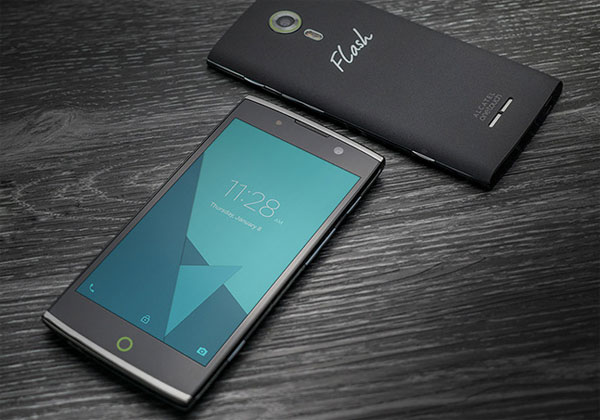
Recently I purchased this phone at Lazada, everything was perfect till I found out about its very weak volume that i used to loudspeaker the phone every time I'm using the call function. Upon a minute of googling, I found the way to increase the volume of this incredible phone by accessing the engineering mode. Here we go;
1. On your dialpad, dial *#*#3646633#*#*

2. Slide your finger left twice and enter into Audio option.

There are several options but I only adjust these three options:

- Normal mode (adjusts the music volume from the speaker)
- Headset mode (for headset volume for Music, FmRadio etc.)
- Loudspeaker mode (FmRadio, Incoming call volume, Loudspeaker on call etc.)


3. The default Volume is 112 and the default Max Volume is 128, Now increase the Value of Volume and Max Volume depends on your need.
Note: Do not increase at the maximum, to prevent speaker damage. Also back up data...before calibrating. Tried and tested but still do at your own risk.
Sunday, July 17, 2016
HOW TO MODIFY WIFI NAME AND PASSWORD OF GLOBE LTE MODEM (B315s-936)
1, Open your browser (ex. google chrome, internet explorer, firefox, etc.)
2. Type 192.168.254.254 on address bar of your browser.
3. Click Login
username: user
password: @l03e1t3
password in words: at sign, small letter L, zero, three, small letter E, one, small letter T, three
4. Click SETTINGS
5. Click WLAN
6. Click WLAN Basic Settings
- Hover and click your mouse to SSID to change your wifi name.
- Hover and click your mouse to WPA pre-shared key to change your wifi password, password must be at least 8 characters.
7. Lastly, Click APPLY
Tips: Just in case the following instructions above doesn't work for you and you can no longer access your wifi, simply use the LAN cable included in the modem's box in order to access the settings of your modem, and restart the whole steps above,
Another thing, worst case scenario, you cannot access your modem thru wifi and even thru LAN (wired cable). Simply long press the reset button at the back of your modem using paper clip or any similar thing for about 10 seconds until the modem restarts or off. Resetting the modem will make all the settings restored to its default.
Contact us:
ruidelvar@yahoo.com.ph
M2ACAT
Sunday, June 28, 2015
Easiest Way To Clear Your Cache
How To Clear Windows 7 Cache
Copy and paste one of the following lines depending on your version to the run windows
(Click start , paste the line)
 start , paste the line)
For 32-bit:
%windir%\system32\rundll32.exe advapi32.dll,ProcessIdleTasks
For 64bit:
%windir%\SysWOW64\rundll32.exe advapi32.dll,ProcessIdleTasks
Mouse Jumping problem while typing
Mouse Jumping problem while typing.
This is a very annoying problem especially when you type looking at your keyboard.
You may be very late to realize that you were typing on the wrong lines because your cursor jumped to wrong lines while you were typing.
The issue bugged me for a while on my HP Pavilion dv6. I blamed my laptop for this and always kept the Touchpad disabled to avoid any instance where the line jumping /shifting happened because of the touchpad or if it was super sensitive that the touchpad detected movements without actually touching it. But disabling touchpad didn't help me.
Finally after long experiments, I could figure out the issue was actually windows. The issue was resolved by disabling an option related to mouse in windows mouse settings. Here's how exactly you can do it.

1) Goto Control Panel
2) If your control panel view is in Category mode, select "View devices and printers" under "Hardware and Sound". Right click the mouse from the list and select "Mouse Settings". You will get the "Mouse Properties" window.
Alternatively if your control panel is in detailed list view, select the "Mouse" option. You will get the "Mouse Properties" window.
3) In the "Mouse Properties" windows select the "Pointer Options" tab.
4) As in the screenshot, unselect the "Hide pointer while typing" checkbox.
5) Apply and OK.
My mouse jumping issue was solved.
Monday, April 23, 2012
mikhmon text
#bin/bash
apt install git php -y
git clone https://github.com/laksa19/mikhmonv3.git
cat >start-mikhmon <update-mikhmon <remove-mikhmon <.bashrc <
Subscribe to:
Posts (Atom)